

I used to spend three hours every evening buried under spreadsheets, customer emails, and meeting recordings until I tested how artificial intelligence can improve everyday business tasks firsthand. Staring at an overloaded inbox after a grueling workday is enough to make anyone want to quit. Handing those repetitive chores over to smart software finally gave me my sanity back and cut my daily admin grind in half.
1. Cleaning Up Messy Meeting Notes
Taking notes during client calls usually means missing half the conversation. Using an automated transcription tool like Fireflies or Otter captures every voice, organizes speakers, and extracts key action items automatically. This eliminates the frantic scramble to scribble down deadlines while someone is still speaking.
You can push those summaries straight into Slack or Asana without opening another tab. My team stopped arguing about who promised what on weekly strategy calls because the timestamped summary is ready thirty seconds after we hang up. It saves roughly three hours of manual meeting documentation every week.

2. Drafting Fast First Responses to Customer Inquiries
Customer support queues can swallow entire mornings if you write every reply from scratch. Linking a generative writing assistant to your helpdesk lets you draft accurate responses based on your existing knowledge base in seconds. The software pulls relevant policies and formats them into friendly, coherent answers.
You simply review the draft, tweak a word or two, and hit send. We saw our first-response time drop by forty percent without sacrificing the personal touch our customers expect. It removes the dread of opening Zendesk on a Monday morning.
3. Categorizing and Scheduling Calendar Invites
Back-and-forth emails to find an open thirty-minute window waste an absurd amount of working time. Modern scheduling engines analyze your work habits, protect your deep-work blocks, and propose ideal meeting times to clients without human intervention.
Tools like Reclaim or Motion automatically shift low-priority tasks when an urgent client consultation lands on your calendar. I no longer spend Friday afternoons manually rearranging my weekly calendar schedule just to make room for a team sync. Everything reschedules itself seamlessly.
4. Email Drafting: How Artificial Intelligence Can Improve Everyday Business Tasks in Your Inbox
Composing follow-up emails, pitch decks, and internal memos often leads to painful creative paralysis. Understanding how artificial intelligence can improve everyday business tasks begins with letting a writing tool generate your rough initial drafts. You provide bullet points with the core facts, and the tool builds a polite, structured email.
This approach completely removes the friction of staring at an empty white screen. I use prompt templates inside Notion to whip up project update emails in less than two minutes. The tone stays consistent, and nothing falls through the cracks.
5. Organizing Unstructured Spreadsheet Data
Sifting through thousands of rows of messy customer feedback or sales logs used to require complex formulas. Modern data tools interpret plain English commands to clean columns, extract phone numbers, and remove duplicate entries instantly.
Instead of writing nested VLOOKUP formulas, you simply ask the software to isolate buyers who spent over five hundred dollars last quarter. It generates the exact pivot table and highlights anomalies in your data cleaning workflow within seconds. Anyone on your team can run deep data analysis without advanced spreadsheet training.

6. Repurposing Long-Form Marketing Content
Producing fresh marketing assets every day burns out creative teams faster than almost anything else. Feeding one long webinar recording or podcast episode into an editor like Descript produces short video clips, social posts, and newsletter snippets in one pass.
The algorithm scans the transcript for viral hooks, trims dead air, and adds animated captions automatically. This single content repurposing pipeline allows a solo creator to sound like a full production studio across four social platforms. You create the core asset once, and the software handles the tedious formatting.
7. Routing and Categorizing Internal Support Tickets
IT and operations teams waste dozens of hours sorting through generic employee requests and assignees. Intelligent classification tools read incoming tickets, identify the underlying issue, and route the request to the correct specialist immediately.
A password reset goes directly to an automated verification workflow, while complex server issues jump straight to senior engineers. This automated ticket triage system prevents bottlenecks and keeps internal operations running without manual dispatching. Employees get their technical roadblocks resolved in minutes rather than days.
8. Auditing Expense Reports and Receipts
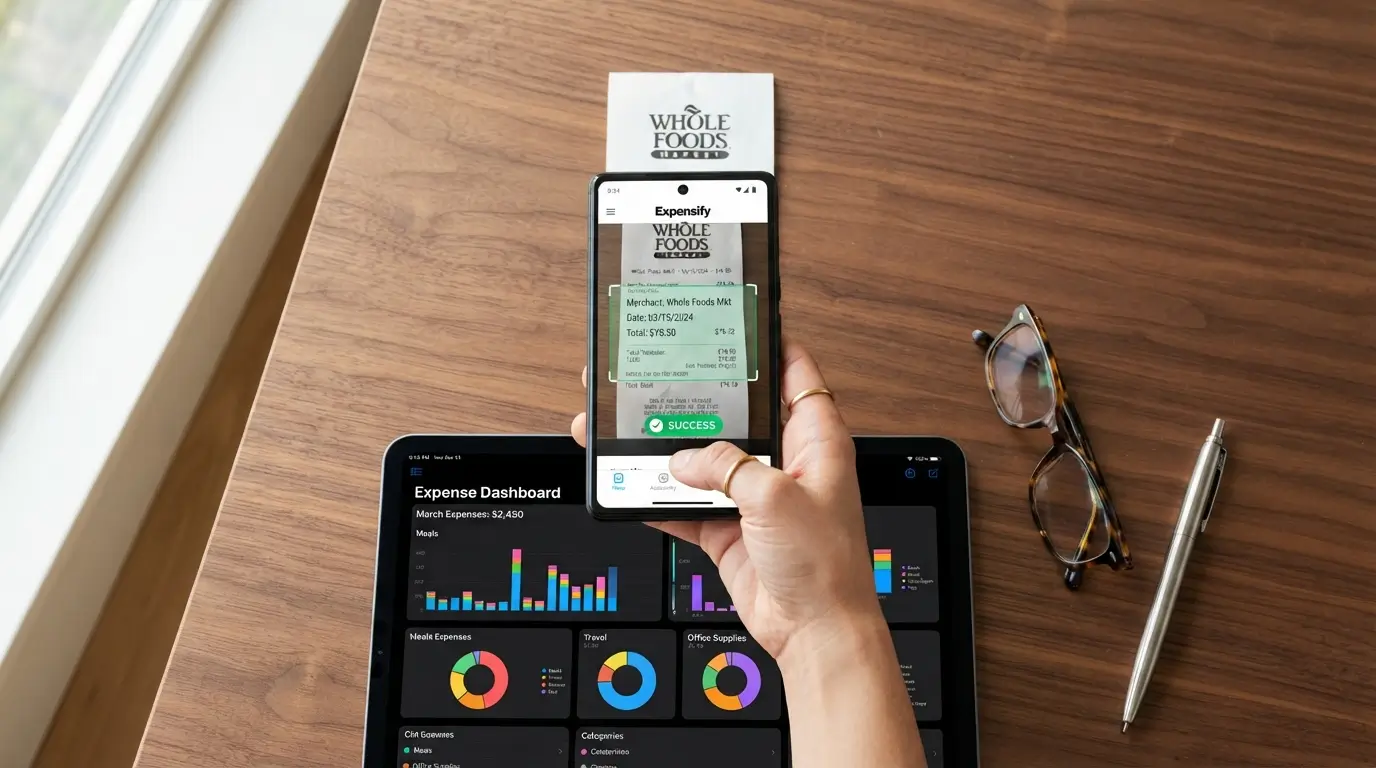
Tracking down lost receipts and verifying credit card line items drains accounting departments at the end of every month. Intelligent expense management platforms scan paper receipts, match them against bank transactions, and flag policy violations before approval.
Employees just snap a photo on their phone, and the system extracts vendor names, sales taxes, and totals instantly. This automated expense reconciliation process caught several accidental double-billings for our team that manual reviews previously missed. It turns a week of accounting headaches into a five-minute approval click.
9. Conducting Competitor and Market Research
Gathering pricing updates, feature releases, and customer sentiment across ten competitors used to take days of manual web browsing. Modern search assistants digest dozens of industry reports, product pages, and review sites to deliver concise comparative breakdowns.
You can see how artificial intelligence can improve everyday business tasks when you ask for a side-by-side feature matrix and get it within thirty seconds. This fast competitive intelligence gathering helps sales reps counter client objections during live calls. It gives your team actionable market facts without hours of manual research.
10. Automating Routine Social Media Customer Monitoring
Keeping up with brand mentions and customer complaints across multiple social channels requires constant vigilance. Social listening tools evaluate the sentiment of incoming messages and alert your team when a frustrated customer needs immediate attention.
The platform filters out spam while prioritizing high-value sales inquiries and urgent support flags. Setting up this automated sentiment tracking system helped our brand address shipping delays before complaints blew up publicly on Twitter. It gives small teams enterprise-level response capabilities without hiring extra weekend staff.
11. Generating Code Snippets and Debugging Technical Scripts
Non-technical founders and operations managers often need simple automations, tracking pixels, or webhook scripts. Code generation tools allow you to describe what you want in plain words and receive functional Python or JavaScript ready to deploy.
If a script breaks, you can paste the error message into the console to get an immediate diagnosis and fix. Utilizing this code generation workflow allowed me to connect our CRM to a custom webhook without hiring an external contractor. It saves thousands of dollars in development retainers for basic tasks.

12. Standardizing Standard Operating Procedures
Building clear training documentation is essential for delegation, yet founders constantly put it off due to time constraints. Screen recording tools now track your mouse clicks and keystrokes while automatically generating step-by-step written SOPs with annotated screenshots.
You execute the task once, and the software creates a polished, numbered guide for your team. This instant process documentation method makes onboarding new virtual assistants completely painless. It ensures tasks get completed correctly every single time without requiring you to record repetitive training videos.
Frequently Asked Questions
Will artificial intelligence replace my staff or make human workers obsolete?
Smart tools handle repetitive admin chores, not human empathy, creative strategy, or complex relationship management. Think of software as an assistant that takes care of the digital busywork so your employees can focus on high-impact projects that actually grow your revenue.
How can small businesses start using artificial intelligence tools on a tight budget?
Begin with free tiers of established platforms like ChatGPT, Notion, or Zapier before investing in expensive enterprise software. Pick one specific bottleneck, like drafting customer emails or transcribing weekly meetings, and master that single tool. You will see immediate time savings without spending extra money.
What is the most effective way artificial intelligence improves day-to-day business productivity?
Automated documentation and inbox management deliver the fastest productivity returns for most companies. Offloading meeting summaries, customer email drafting, and calendar scheduling instantly frees up two to three hours every single day for every employee who uses them regularly.
How secure is company data when using automated business tools?
Security depends on your tool configuration and platform policies. Most reputable business platforms offer enterprise-grade encryption and allow you to opt out of data training models. Always review privacy settings, avoid inputting sensitive customer passwords, and establish clear internal guidelines for your team.
How steep is the learning curve for non-technical employees?
Most modern tools use plain English interfaces, so anyone who can write an email can use them effectively. Your team will not need coding skills or complex technical training. A short thirty-minute team tutorial is usually enough to get everyone comfortable and productive.
Conclusion
Building a smoother workflow does not require overhauling your entire company overnight. Pick one tedious task that drained your energy this week, hand it over to a smart tool, and enjoy the extra breathing room. Which repetitive chore are you most excited to take off your plate first?
Also Read; Best AI Productivity Tools for Students Professionals and Businesses 2026